
POS Software in Pakistan
Deliver faster customer service with streamlined billing and real-time inventory control.
Octal Accounts POS turns any counter into a fast, FBR-ready checkout — scan, bill and sync sales with your inventory and accounts in one connected system.
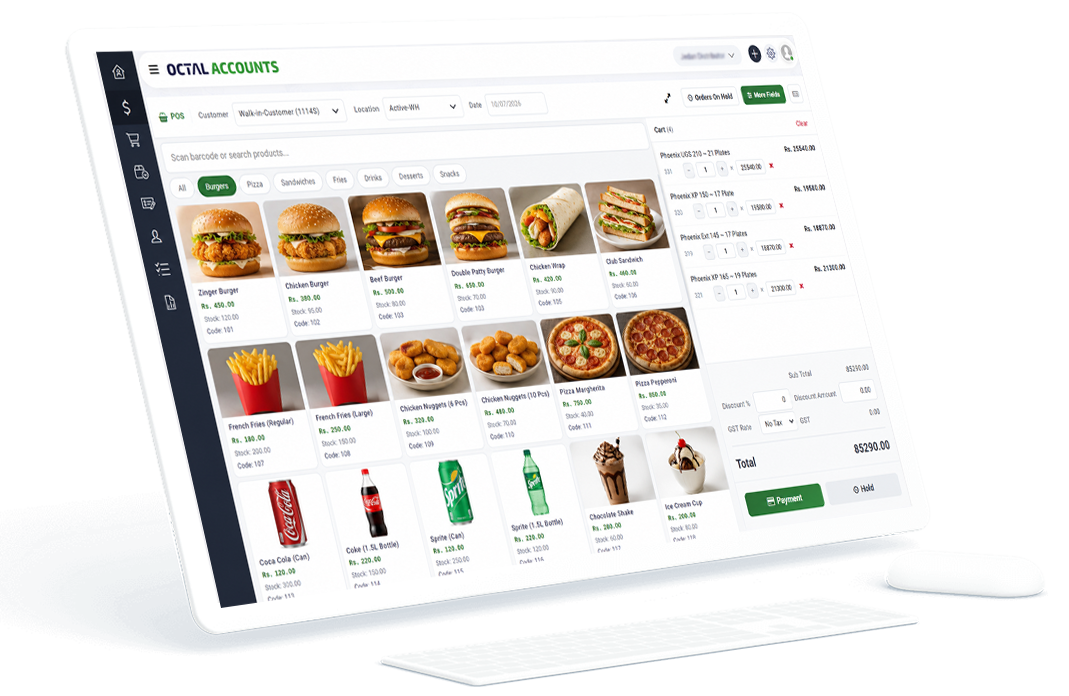
Everything you need to sell faster
Built for retail counters, restaurants and multi-branch outlets, Octal POS keeps checkout quick and your books accurate — with none of the double entry.
Scan & bill in seconds
Scan products with a barcode reader for fast, accurate POS billing that keeps queues moving.
Live inventory & sales sync
Every sale updates your inventory and accounts instantly — no manual stock adjustments.
On-hold orders
Place an order On Hold and resume it later — perfect for interrupted sales or customers with multiple purchases.
Multi-branch settings
Each location gets its own POS configuration — default Customer, GST, Bank and Payment Mode applied automatically.
FBR digital invoicing
Report retail sales to FBR digital invoicing in real time, straight from the till.
Easy to use
A clean, touch-friendly screen your staff can learn in minutes — with smart defaults that cut data entry.
How POS billing works with Octal
Who it’s for
Frequently asked questions
Does Octal POS work for multiple branches?
Yes. Each business location can have its own independent POS configuration, with default Customer, GST, Bank and Payment Mode selected automatically for that location.
Can I put a sale on hold and resume it later?
Yes. The POS screen lets you place orders On Hold and resume them anytime, so you can handle interrupted sales or customers with multiple purchases.
Is the POS integrated with FBR digital invoicing?
Yes. POS sales can be reported to FBR digital invoicing in real time, so your retail billing stays compliant automatically.
Does POS billing update my inventory automatically?
Yes. Every POS sale syncs with your inventory and accounts instantly, keeping stock levels and financial records accurate.
Speed up checkout and keep your books in sync.
Start a free trial and see how fast FBR-ready POS billing can be.